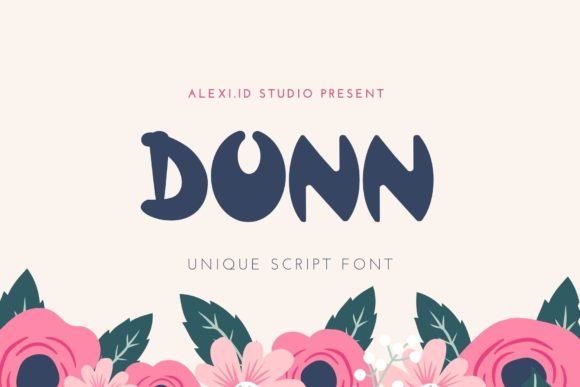
Dunn: A Playful Display Font for Handmade Brands
As a maker who designs printable wall art, hand-stamped tags, and seasonal SVG bundles for Etsy, I’m always hunting for display fonts that do more than just look cute—they need to work. Dunn is one of those rare typefaces that lands perfectly between charm and commercial practicality. It’s not overly ornate, but it’s never boring. With its bouncy letterforms, friendly curves, and subtle irregularities, Dunn feels handmade—like it was sketched with a chisel-tipped marker—but clean enough to hold up on laser-cut wood signs or tiny ¾-inch sticker labels.
Dunn shines brightest where personality matters most: product labels for small-batch candles, boutique soap wraps, or artisanal jam jars. Its open counters and generous x-height mean even at 12 pt, the word “Honey” or “Lavender” stays legible on a matte-finish kraft tag. I’ve used Dunn for custom wedding welcome boards—paired with a crisp sans serif for names and dates—and customers consistently comment on how “warm” and “inviting” the signage feels. That’s Dunn’s quiet superpower: it adds emotional resonance without sacrificing clarity.
For crafters using Cricut Design Space or Silhouette Studio, Dunn cuts cleanly at sizes as small as 0.25 inches (yes—I tested it on mini gift tags). Its sturdy stems and consistent stroke weight prevent breakage in intricate letters like “a,” “e,” or “g.” No fragile serifs or hairline terminals to snap mid-cut. And because it’s a true display font—not a script or handwritten style—it holds up beautifully when scaled large for farmhouse-style wall decals or framed digital printables sold as instant downloads.
I reach for Dunn first when designing greeting cards, especially birthday and baby announcements. Its cheerful energy lifts simple layouts instantly. Try “Happy Birthday!” in Dunn at 48 pt over a watercolor background, then layer a soft sans serif like Montserrat Light for the rest of the message. The contrast feels intentional, not accidental. Same goes for holiday packaging: “Merry & Bright” in Dunn on a linen pouch reads festive but refined—not cartoonish. It avoids the “clipart trap” many playful fonts fall into.
Readability extends beyond print. When previewing mockups for digital products—think planner undated pages or weekly habit trackers—I use Dunn for section headers (“Weekly Goals,” “Gratitude Log”) because it pops on screen without straining the eyes. Unlike some decorative fonts that blur at lower resolutions, Dunn’s outlines stay sharp across devices. That’s critical when your buyers are viewing thumbnails on mobile before purchasing your Canva-editable templates.
Font pairing is where Dunn really sings. It pairs effortlessly with:
- A relaxed script font (like Quicksand Script or Lavanderia) for invitations—Dunn for the event name, script for the couple’s names;
- A neutral sans serif (Inter, Manrope, or Work Sans) for labels and packaging—Dunn for the product name, sans for ingredients or care instructions;
- An understated serif (Playfair Display or Cormorant Garamond) for wedding stationery—Dunn for “Welcome,” serif for ceremony details.
Dunn includes standard OpenType features—ligatures for smoother “ff,” “fi,” and “fl” connections, plus stylistic alternates for letters like “a” and “g” if you want to add subtle variation across multiple designs. It supports Latin-based languages (English, Spanish, French, German), so it’s safe for bilingual shop labels or international printable bundles. File formats include .OTF and .TTF—fully compatible with Adobe Creative Cloud, Affinity apps, Cricut Access, and free tools like Canva and Google Fonts (when self-hosted).
Here’s what works—and what doesn’t—with Dunn in real production:
- Yes: Short phrases, titles, logos, SVG cut files, enamel pin text, mug decals, tote bag prints, chalkboard-style signs, printable quote art, and boutique hang tags.
- No: Body text, ingredient lists, legal disclaimers, or anything longer than two lines. It’s a display font—not meant for paragraphs.
- Smart middle ground: Use Dunn for the headline on a printable recipe card, then switch to a clean sans serif for measurements and steps.
Licensing matters—especially if you’re selling physical goods or digital assets. Dunn is a commercial font, meaning you can use it in client work, sell items featuring Dunn (like mugs or stickers), and include it in editable Canva or PowerPoint templates—as long as your license permits multi-user or extended use. Always double-check the license terms before bundling Dunn into SVG files or reselling it as part of a design asset pack. Most reputable sellers offer clear commercial licenses; avoid free “Dunn-inspired” knockoffs—they lack the precision, spacing, and support needed for professional output.
What makes Dunn stick in my workflow isn’t just how it looks—it’s how it performs. It speeds up design time because I don’t second-guess legibility. It builds brand consistency across my product line: same font on my Etsy banner, candle labels, and digital wall art previews. And customers notice. They’ll say, “Your shop has such a friendly vibe”—and that tone starts with a single, well-chosen display font.
If you’ve been rotating through fonts that feel either too stiff or too chaotic, give Dunn space in your next project. Try it on a sample batch of thank-you cards. Drop it into your next Cricut sign file. Use it to title a new printable bundle. You’ll feel the difference—not just in aesthetics, but in how confidently and consistently your handmade brand communicates.